150+ Customers | 12+ Years in Service | MSC Status

Power BI

Data Ware Housing and Analytics

ERP

Dynamics 365 Implementation and Support

SharePoint

BPM, Workflow, Intranet Solutions

iScan OCR on SharePoint

Document Digitization Platform

iScan OCR on SharePoint

Tailored specifically for SharePoint, this solution seamlessly integrates with the platform, ensuring compatibility and ease of use.

ERP Dynamics 365 Business Central

Streamline and grow your business with, a comprehensive business management solution for small and medium-sized..


SharePoint OCR

Upload Images to SharePoint, OCR & Digitize

Moving from Shared Drive or the traditional approch for managing files and folder to SharePoint Online (SPO), you need to develop a proper file plan. A file plan is a virtual cabinet for storing files, folder, categorise them and their retention schedule. Below we will explain more on file plan for you to have a better clarity while implementing this in SharePoint online. 

File Plan:

Objective of File Plan is to categorize documents for organizations in such a way that Users should be able to find it easy to navigate and use in SharePoint. To be specific in this step, we have to identify and confirm the type of file plan to create for companies and implement further in SharePoint Online with the agreed approach.

File plans are generally hierarchical and based on the functions and activities of the department or organization.

  • Level 1 = Function
    • Level 2 = Activity (Process) - An activity (or process) is part of a function.
      • Level 3 = Record Class - The record class is part of the activity (or process). 

Benefits:

  • Later the file plans would all roll up into one master plan and retention schedule but each department would only have to be concerned about its records and information.
  • Users should be able to find it easy to navigate and use. This means that users can successfully predict in which category they are likely to find the content they want, just by looking at the top level.
  • In future we can apply unique retention and disposition and, in many cases, security requirements as well.
  • And the file plan can ensure consistency in retention and disposition. Depending on how the file plan is implemented in SharePoint, policies can be set up to automatically identify and potentially dispose of information that has met its retention period. This is typically done through inheritance – that is, once the record is put into the appropriate place in the repository, it inherits retention and disposition rules. The user doesn’t need to know necessarily where that appropriate place is either; this can be managed using information management policies and workflows.

Create File Plan:

The file plan has to be developed before it can be implemented in SharePoint. The process consists of the following basic steps.

  • Develop a business classification scheme (BCS)
  • Conduct a records and information inventory
  • Develop the file plan classification structure

Below table will assist in achieving above steps

Function

Activity

Record

Format

Retention

Disposition

(Document Library)

Folders

File

Type of File

How Long to keep file

What to do once the duration of file expires. Destroy or Migrate or ??

IT

Software Installation

SDD

Word

3 yr

Destroy


IT inventory

Inventory List

Excel


User Details

IC

PDF


Test File Plan:

  • Ask users in the organization to classify their documents and records using the file plan using Folders.
  • Ideally everything the users do and create should fit in exactly one place in the file plan. If there are documents that meet multiple classification structures, or that do not fit into any of the categories, add those in Activity list.
  • It is important to do this testing before the file plan is implemented in SharePoint because it is easier to correct these issues in a spreadsheet than to change SharePoint libraries or folders.

Are you looking for a Microsoft Partner to implement Document Management in SharePoint. Call us to discuss further. 

You can integrate the productivity services in SharePoint Online with on-premises SharePoint Server 2019 by using a SharePoint Server 2016 hybrid environment.


A SharePoint Server 2019 hybrid environment is based on trusted communications between SharePoint Online and SharePoint Server 2016. When you have established this trust framework, you can combine an on-premises SharePoint Server deployment with a SharePoint Online cloud solution and deliver a consistent user experience across a combined environment. For example, you can use the unified search capability to search across both parts of a hybrid solution (on-premises and online) by using a single search query.


Hybrid environments are helpful when it is not possible for an organization to fully migrate its SharePoint deployment to the cloud due to business, technical, or other reasons.

For example, there might be a compliance or data sovereignty policy in your organization that requires data to be hosted in a particular location. By using the hybrid model, your organization can start to achieve the benefits associated with the use of a cloud solution while at the same time continuing to use an on-premises deployment that provides the data governance and customization flexibility you require. By using a hybrid solution, your organization can achieve a higher degree of flexibility than you would have achieved if you forced a choice between an on-premises model or a cloud model. For users, the hybrid model is mostly transparent.

High-performing companies use analytic solutions strategically. What does your company do? Making analytics and metrics easy for employees to use will help the people within your company understand your business and achieve success. A business intelligence (BI) and analytics strategy empowers your employees with the right information at the right time. The result? Insightful business knowledge with the ability to anticipate change and uncover new opportunities.

MSBI

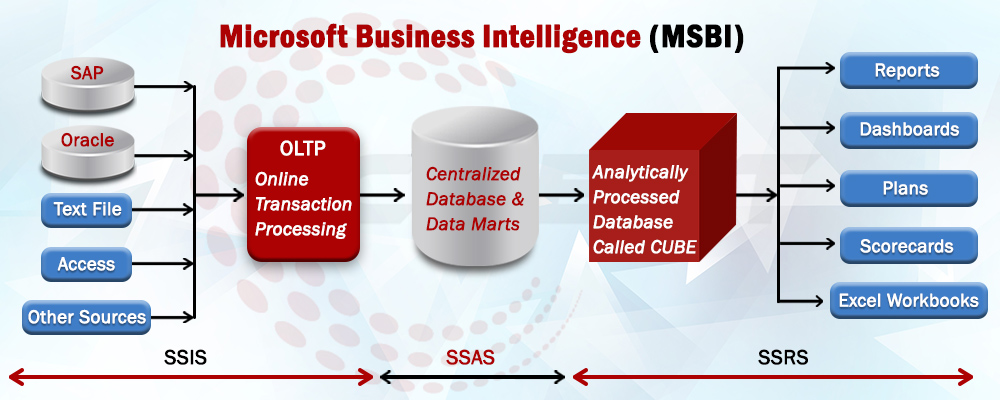
Out of many BI Solutions, MSBI( Microsoft Business Intelligence) proides a wide range of services to improve your business. MSBI is the Microsoft suite comprising of various tool for implementing Business intelligence solutions. MSBI is a powerful suite and is composed of tools which helps in providing best solutions for Business Intelligence and Data Mining Queries. MSBI empower users to gain access to accurate and up-to-date information for better decision making in an organization. This tool uses Visual studio along with SQL server and offers different tools for different processes which are required in Business Intelligence (BI) solutions.
 
MSBI includes the following services
 
1. SSIS - SQL Server Integration Services (Integration Tool)
2. SSAS - SQL Server Analytical Services (Analysis Tool)
3. SSRS - SQL Server Reporting Services (Reporting Tool)
 
“A visual always help better to understand any concept.”  Below Diagram broadly defines “Microsoft Business Intelligence (MSBI)”.
 

BI


Advantages of MSBI:
1.Easy data exploration and visualization
2.Managed self-service Business Intelligence(BI)
3.Full use of native Excel features
4.Dashboards, guided navigation, and drill-down
5.Full Support to .Net, WebService
6.Complete End-to-End Solution
7.MSBI also Supports SEMI WareHousing Application


SharePoint is a technology that organizations and business units of all sizes use to improve team productivity and to increase the efficiency of business processes.
SharePoint capabilities are available in SharePoint Server 2016 and SharePoint Online.

SharePoint Server 2016 gives you a powerful toolset for organizing content, managing documents, sharing knowledge, providing robust collaboration environments, and finding information and people. You and your colleagues can use the social functionality in SharePoint Server 2016 to build communities, share thoughts and ideas, and discover resources and knowledge in your organization.

SharePoint Server 2016 helps teams stay connected and productive by providing an infrastructure and capabilities that allow easy access to people, documents, and information that they need. By using SharePoint 2016, teams can create websites to share information and foster collaboration with other users. You can access content stored within a SharePoint site from a web browser and through client programs and apps, such as Office, running on multiple devices.

In addition to SharePoint Server 2016, which resides on one or more servers in your organization (that is, on-premises), SharePoint capabilities are available as a webbased service called SharePoint Online that is hosted outside your organization in the cloud. “In the cloud” means that the IT infrastructure resides off your organization’s property (that is, off-premises), and that the infrastructure is maintained by a third party. SharePoint Online is a cloud service that you can use to access information and interact with your team from nearly anywhere, on many types of devices.

SharePoint Online is a subscription-based service. Instead of installing SharePoint Server 2016 software in your organization, you can buy a subscription plan to use
this software as a service. SharePoint Online is a part of Microsoft Office 365, which also includes Microsoft Exchange Online for web-hosted mail service and Skype for Business for web-based conferencing. There are a number of subscription plans available that provide different sets of features and capabilities, from basic to enterprise level, for a monthly fee. The SharePoint Online service is available as a part of multiple Office 365 subscription plans, or as a standalone subscription plan.

For more information about Office 365 SharePoint and available plans and pricing, go to https://products.office.com/en-us/sharepoint/compare-sharepoint-plans 

Image

MISSION

Striving to provide value-driven services to the automation needs of our customers using best-in-class tools and technologies.

Image

VISION

Our aim is to: deliver sustainable benefits to customers have continuous growth of the company achieve the welfare of employees, their families, and society

Silver

MICROSOFT PARTNER

bi-partner.jpg
newgen-partner.jpg
sellacious-partners.jpg

Crest Business Solutions

We are information technology, consulting, and services company that specializes in developing software products and providing services to cater to the automation and process improvement needs

CONTACT US

CREST BUSINESS SOLUTIONS SDN BHD
6, Danau Desa Business Center,
Jalan 4/109f, Taman Danau Desa, 58100 Kuala Lumpur,
Malaysia

H/P (Whatsapp) - 0126721050

Phone: +603 7972 5186, Email: info@crestsolution.com.my