CONTACT US
CREST BUSINESS SOLUTIONS SDN BHD
6, Danau Desa Business Center,
Jalan 4/109f, Taman Danau Desa, 58100 Kuala Lumpur,
Malaysia
H/P (Whatsapp) - 0126721050
Phone: +603 7972 5186, Email: info@crestsolution.com.my
150+ Customers | 12+ Years in Service | MSC Status

Moving from Shared Drive or the traditional approch for managing files and folder to SharePoint Online (SPO), you need to develop a proper file plan. A file plan is a virtual cabinet for storing files, folder, categorise them and their retention schedule. Below we will explain more on file plan for you to have a better clarity while implementing this in SharePoint online.
Objective of File Plan is to categorize documents for organizations in such a way that Users should be able to find it easy to navigate and use in SharePoint. To be specific in this step, we have to identify and confirm the type of file plan to create for companies and implement further in SharePoint Online with the agreed approach.
File plans are generally hierarchical and based on the functions and activities of the department or organization.
The file plan has to be developed before it can be implemented in SharePoint. The process consists of the following basic steps.
Below table will assist in achieving above steps
|
Function |
Activity |
Record |
Format |
Retention |
Disposition |
|
(Document Library) |
Folders |
File |
Type of File |
How Long to keep file |
What to do once the duration of file expires. Destroy or Migrate or ?? |
|
IT |
Software Installation |
SDD |
Word |
3 yr |
Destroy |
|
IT inventory |
Inventory List |
Excel |
|||
|
User Details |
IC |
|
Are you looking for a Microsoft Partner to implement Document Management in SharePoint. Call us to discuss further.
You can integrate the productivity services in SharePoint Online with on-premises SharePoint Server 2019 by using a SharePoint Server 2016 hybrid environment.
A SharePoint Server 2019 hybrid environment is based on trusted communications between SharePoint Online and SharePoint Server 2016. When you have established this trust framework, you can combine an on-premises SharePoint Server deployment with a SharePoint Online cloud solution and deliver a consistent user experience across a combined environment. For example, you can use the unified search capability to search across both parts of a hybrid solution (on-premises and online) by using a single search query.
Hybrid environments are helpful when it is not possible for an organization to fully migrate its SharePoint deployment to the cloud due to business, technical, or other reasons.
For example, there might be a compliance or data sovereignty policy in your organization that requires data to be hosted in a particular location. By using the hybrid model, your organization can start to achieve the benefits associated with the use of a cloud solution while at the same time continuing to use an on-premises deployment that provides the data governance and customization flexibility you require. By using a hybrid solution, your organization can achieve a higher degree of flexibility than you would have achieved if you forced a choice between an on-premises model or a cloud model. For users, the hybrid model is mostly transparent.
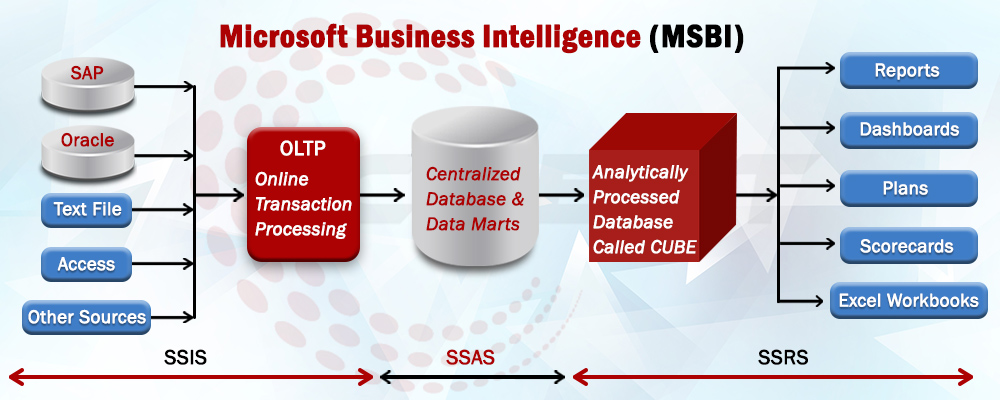
MSBI
SharePoint is a technology that organizations and business units of all sizes use to improve team productivity and to increase the efficiency of business processes.
SharePoint capabilities are available in SharePoint Server 2016 and SharePoint Online.
SharePoint Server 2016 gives you a powerful toolset for organizing content, managing documents, sharing knowledge, providing robust collaboration environments, and finding information and people. You and your colleagues can use the social functionality in SharePoint Server 2016 to build communities, share thoughts and ideas, and discover resources and knowledge in your organization.
SharePoint Server 2016 helps teams stay connected and productive by providing an infrastructure and capabilities that allow easy access to people, documents, and information that they need. By using SharePoint 2016, teams can create websites to share information and foster collaboration with other users. You can access content stored within a SharePoint site from a web browser and through client programs and apps, such as Office, running on multiple devices.
In addition to SharePoint Server 2016, which resides on one or more servers in your organization (that is, on-premises), SharePoint capabilities are available as a webbased service called SharePoint Online that is hosted outside your organization in the cloud. “In the cloud” means that the IT infrastructure resides off your organization’s property (that is, off-premises), and that the infrastructure is maintained by a third party. SharePoint Online is a cloud service that you can use to access information and interact with your team from nearly anywhere, on many types of devices.
SharePoint Online is a subscription-based service. Instead of installing SharePoint Server 2016 software in your organization, you can buy a subscription plan to use
this software as a service. SharePoint Online is a part of Microsoft Office 365, which also includes Microsoft Exchange Online for web-hosted mail service and Skype for Business for web-based conferencing. There are a number of subscription plans available that provide different sets of features and capabilities, from basic to enterprise level, for a monthly fee. The SharePoint Online service is available as a part of multiple Office 365 subscription plans, or as a standalone subscription plan.
For more information about Office 365 SharePoint and available plans and pricing, go to https://products.office.com/en-us/sharepoint/compare-sharepoint-plans
We are information technology, consulting, and services company that specializes in developing software products and providing services to cater to the automation and process improvement needs
CREST BUSINESS SOLUTIONS SDN BHD
6, Danau Desa Business Center,
Jalan 4/109f, Taman Danau Desa, 58100 Kuala Lumpur,
Malaysia
H/P (Whatsapp) - 0126721050
Phone: +603 7972 5186, Email: info@crestsolution.com.my